Delete Your Account and Data
Last Updated on July 16, 2026
This page explains how to delete your Steer account and the personal data associated with it. You can do this yourself inside the Steer Astro Android app, or ask us to do it for you by email. This page supplements the Privacy Policy.
Delete your account in the app
The fastest way is directly in the Steer Astro Android app:
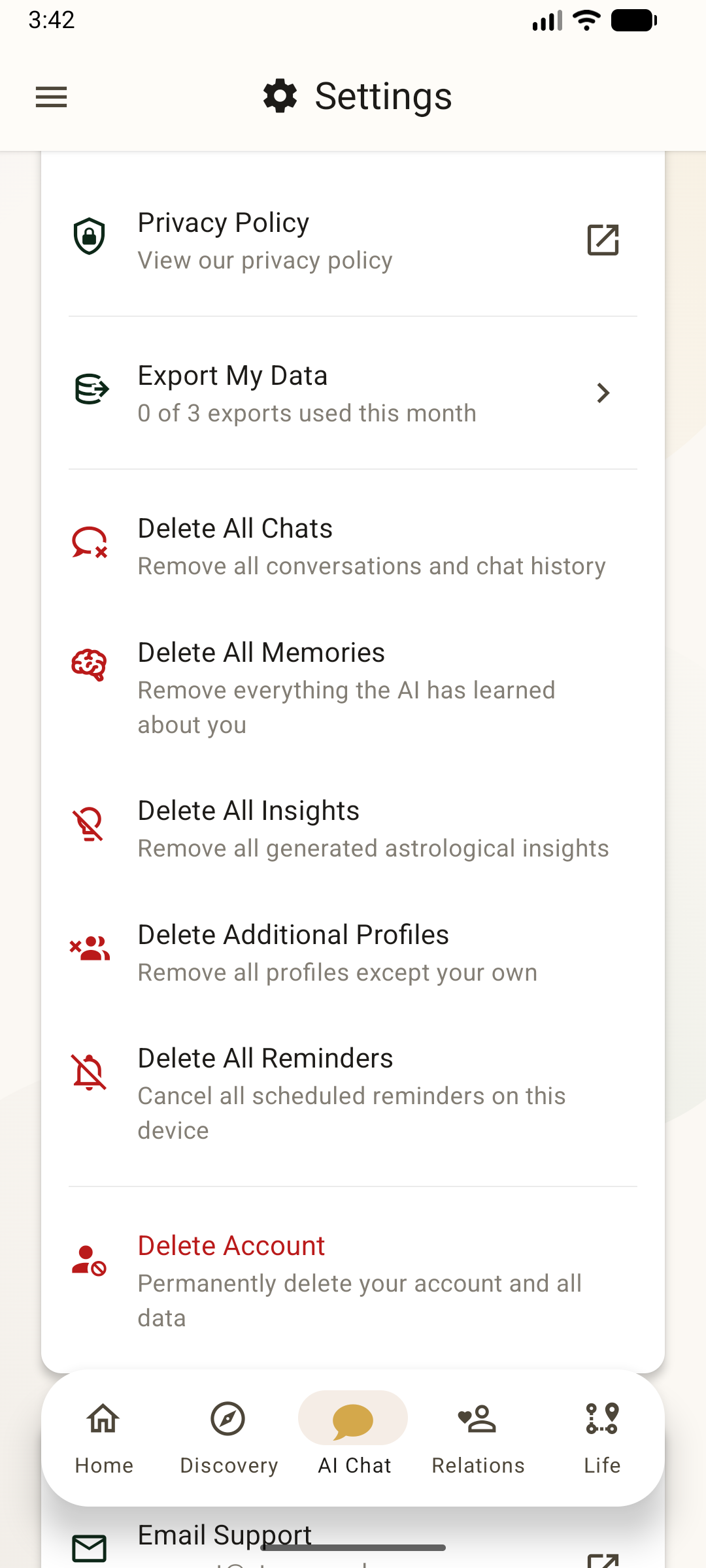
- Open the Steer Astro Android app and go to Settings (the gear icon).
- Scroll to the Privacy and Data section.
- Tap Delete Account — "Permanently delete your account and all data".
- Confirm when prompted. Your account and personal data are deleted immediately.
Delete specific data without closing your account
If you want to remove some data but keep your account, the same Settings screen lets you delete individual categories:
- Delete All Chats — remove all conversations and chat history.
- Delete All Memories — remove everything the AI has learned about you.
- Delete All Insights — remove all generated astrological insights.
- Delete Additional Profiles — remove all family and friend profiles except your own.
- Delete All Reminders — cancel all scheduled reminders on this device.
You can also delete an individual conversation or an individual memory from the in-app chat history and Memories screens.
Request deletion by email
If you cannot access the app, or you would rather we handle it, email us and we will delete your account and personal data for you.
Email: support@steer.coach
Please send your request from the email address registered to your Steer account, or include enough detail for us to verify your identity. Use the subject line "Account and data deletion request". We will verify your identity (typically through your registered email address) and complete the deletion within the timeframe required by applicable law, generally within 30 days.
Active subscriptions
Deleting your Steer account does not cancel a Steer subscription. Subscriptions are billed by Google (Google Play), not by Steer, and will keep renewing until you cancel them in Google Play — even after your account is deleted. Any remaining paid time will not carry over to a new account.
To avoid further charges, cancel your subscription before deleting your account:
- Google Play: open play.google.com/store/account/subscriptions, or in the Play Store app tap your profile icon, then Payments & subscriptions → Subscriptions.
If you need help with a subscription or a charge, email support@steer.coach.
What is deleted
When you delete your account — whether in the app or by email — we permanently delete your personal information immediately, including:
- Your profile and birth details, and the birth details of any family or friend profiles you added.
- Your conversations and chat history.
- The AI-inferred memories Steer saved from your conversations.
- Your generated astrological insights and computed charts.
- Your notifications, scheduled reminders, push tokens, and device registrations.
- Your friends-and-family records.
What we retain, and for how long
The only exception is a limited set of records we are required to keep for billing, legal, or dispute-resolution purposes. Where applicable, we retain those records for two years from the date of account closure, after which they are deleted. We do not use retained records for any purpose other than the legal or billing obligation for which they are kept. This mirrors the retention terms in the Privacy Policy (see sections 3 and 10.3).
Export your data first
Deletion is permanent and cannot be undone. If you would like a copy of your data before deleting, use Export My Data on the same Settings screen, or email support@steer.coach. Exports are provided in a machine-readable JSON format that includes your profile, conversation history, AI-inferred memories, and account metadata.
Questions
For any questions about deleting your data, contact:
Samarth Bhargava
Email: support@steer.coach